AI coding session trackers: what they measure, and what they miss
Menu-bar trackers like SessionWatcher answer 'what did today cost me and am I about to hit a limit'. They answer it well. Here is where that question stops being the one you need, and what a team-level view measures instead.
There are now two quite different kinds of tool that both get described as “AI coding session tracking”, and choosing the wrong one wastes either money or months.
The first kind sits in your menu bar and watches your own machine. The second ingests sessions across a team and joins them to what shipped. They are not competitors. They answer different questions, and most people asking about session tracking want the first one.
The individual tracker
SessionWatcher is the clearest example. It is a native macOS app that lives in the menu bar, auto-detects the AI coding tools you have installed, and reads the usage data those tools already write to your Mac. No API keys, nothing extra to log into. It tracks Claude, Codex, Copilot, Cursor and Gemini, and it tells you what you have spent and how close you are to a rate limit. Licences are a one-off purchase - $6.99 for a single tool, $14.99 for a bundle covering Claude, Codex and Cursor.
Open-source command-line tools such as ccusage occupy the same space: read the local logs, total up the tokens, print the cost.
This is a real question and these tools answer it properly. “Am I about to get locked out mid-task” and “what did this month actually cost me” are worth knowing, and a £6 menu-bar app that reads files already on your disk is close to the correct amount of engineering for them.
If that is your question, buy one of these. Genuinely - you do not need a platform, an account, or an ingestion pipeline to find out how many tokens you used yesterday.
Where it stops
The design that makes them good is also the boundary:
- One machine. The data lives on your laptop because that is where the logs are. There is no team view, because there is no team.
- Usage, not outcome. Tokens, cost and rate limits are all measures of consumption. None of them knows whether the session produced anything.
- Now, not history. These are dashboards for the current period. They are not built to answer what changed between March and September.
None of that is a criticism. It is the shape of a tool that costs seven dollars and needs no server.
The team question
The second kind of tool exists because a different question turns up once more than one person is involved, and usually once somebody is paying for seats:
We are spending a meaningful amount on AI coding assistance across the team. Is the work getting done, and is it holding up?
No amount of token accounting answers that, because every term in it is about outcome and every term in token accounting is about consumption. You can double your token spend and ship less. The charts will look excellent throughout.
This is what GuideMode does. It ingests individual coding sessions - Claude Code and Codex today, with further assistants in progress - extracts 119 session-level metrics from each, and then joins those sessions to the pull requests, issues and deployments they produced. The join is the point. A session on its own is an activity record; a session connected to a merged pull request that later survived in production is evidence.
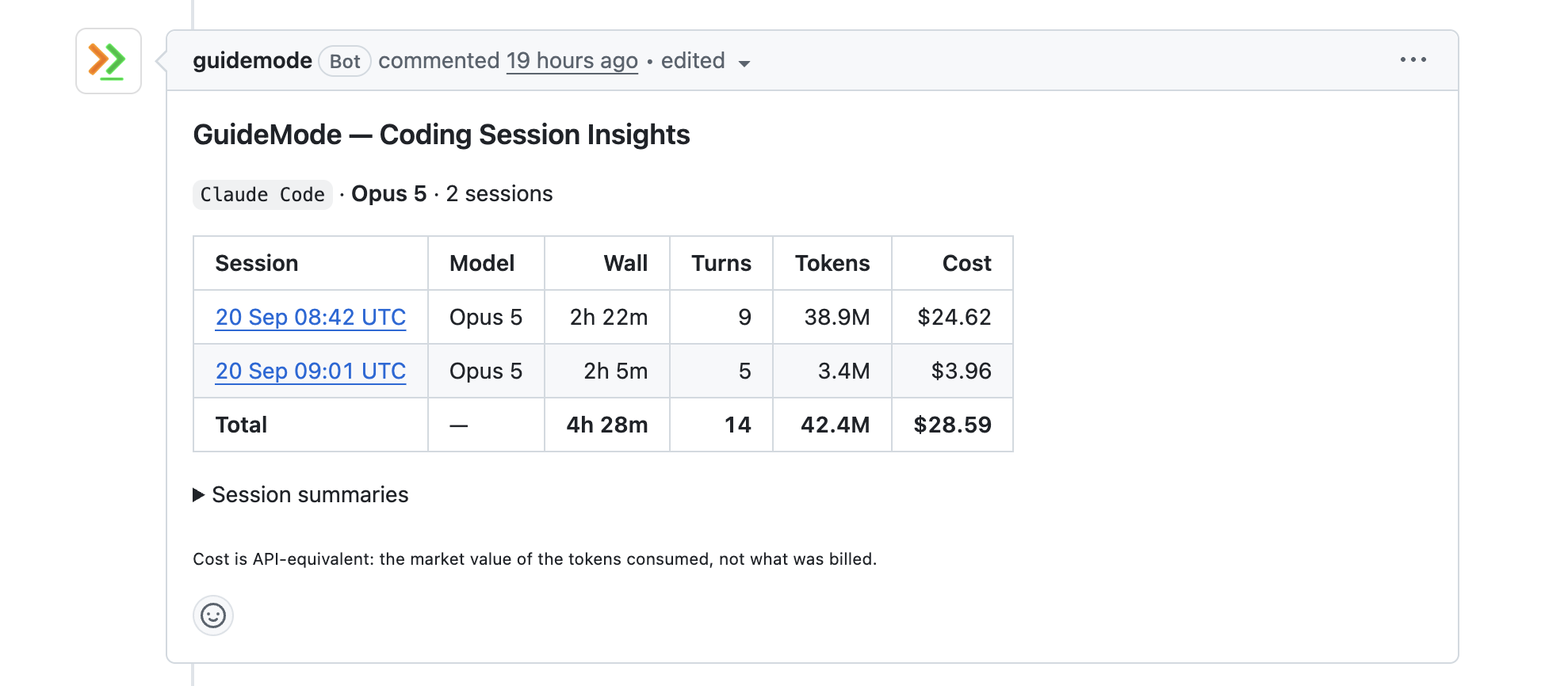
Here is what that looks like from the side you already work on - a comment on the pull request itself, listing the sessions that produced it:
This is the difference in one screenshot. An individual tracker can tell you that you spent $28.59 on Tuesday. It cannot tell you which pull request it bought.
On top of that sit the measures that only make sense across a team and over months: delivery flow, DORA metrics, and Change Effort Units, which score a merged change for effort, cost and risk. CEU measures effort, cost and risk - never value. Confirmed Change Value is the half that only counts effort a production outcome later confirmed.
Side by side
| Individual trackers | GuideMode | |
|---|---|---|
| Assistants covered | Claude, Codex, Copilot, Cursor, Gemini | Claude Code, Codex (more in progress) |
| Scope | Your machine | The team, across repositories |
| Primary question | What did this cost, am I near a limit | Did the work ship, did it hold up |
| Setup | Install, done | Account, CLI hooks, repository policy |
| Data location | Stays on your Mac | Redacted locally, then uploaded - or self-hosted on your own infrastructure |
| Session metrics | Tokens, cost, limits | 119 per session |
| Links to shipped work | No | Pull requests, issues, deployments |
| History | Current period | Months, with trend |
| Cost | One-off, single figure | Hosted platform |
The honest caveats
Three things about our side of that table that you should weigh before choosing it.
It is a hosted platform, not a purchase. You get an account, an ingestion pipeline and a bill, where the alternative is a one-off licence and a menu-bar icon. If you only want the usage number, this is a great deal more machinery than the question deserves.
Your session data leaves the machine - unless you host it yourself. Redaction runs locally before anything is uploaded, it is on by default, and policy is per repository so a repo is never synced unless you say so. It is still an upload, and for some codebases that is the end of the conversation.
For those cases GuideMode can be self-hosted on your own infrastructure, so the sessions never leave your network at all. That is an enterprise arrangement rather than a signup button - enterprise@guidemode.dev - and it is worth being clear that running it yourself means running a database and a job runner, which is a real operational commitment and not a checkbox. The menu-bar tools never have this problem at all, because the data never moves in the first place.
We support fewer assistants than they do. GuideMode captures Claude Code and Codex. SessionWatcher covers Claude, Codex, Copilot, Cursor and Gemini. If your team is on Cursor or Copilot, the individual tracker is not merely the cheaper option today - it is the only one of the two that works for you. More providers are in progress, which is a promise and not a feature, and you should buy on what exists.
Outcome measurement needs history. Joining a session to a change that survived in production requires the survival window to have elapsed. In the first fortnight you will have activity data and not much else. The usage trackers are useful within about ninety seconds of installation.
Which one you want
- Your team is on Cursor, Copilot or Gemini. An individual tracker, today. We do not capture those yet, and no amount of team-level machinery helps if the sessions never arrive.
- Just you, and you want to know the cost or the limit. An individual tracker. SessionWatcher if you are on a Mac and want it to look after itself,
ccusageif you would rather have a CLI. - Just you, but you want to know whether the work is any good. Either, honestly. The team machinery is mostly wasted on one person, though the session quality scoring still works.
- A team on Claude Code or Codex, with seats being paid for and somebody asking what the return is. The usage trackers cannot answer this and are not trying to. That is the case we built for.
A note on why we wrote this
We rank on page one for searches about SessionWatcher without ever having mentioned it, which is a slightly embarrassing way to get traffic. People arriving on that search deserve a straight answer about what the two kinds of tool do, including the cases where the seven-dollar option is the right one.
Related reading
- Measuring AI Productivity: Beyond Adoption Metrics
- Measuring developer experience when a machine writes some of the code
- Code Review Bottlenecks in the AI Era
Ready to see what your team’s sessions connect to? Start free | See AI session analytics | View pricing
Need it inside your own network? GuideMode can be self-hosted - enterprise@guidemode.dev.